BDD with Robot Framework: Gherkin Guide (2026)

Behavior-Driven Development (BDD) with Robot Framework combines Gherkin-style Given/When/Then syntax with Robot Framework's keyword-driven engine. You write scenarios in business-readable plain English, then map each step to a reusable Robot keyword that drives the system under test. The result: tests that product managers can read and engineers can maintain. This guide covers the setup, syntax, Example Mapping, and 2026 patterns — including AI-assisted scenario generation — with working examples you can copy.
Key Takeaways
- Robot Framework supports Gherkin (
Given,When,Then,And,But) natively — no extra plugin, no separate runner. The keywords are simply ignored prefixes that bind to your keyword definitions. - BDD lives or dies in the Discovery step, not the syntax. Use Example Mapping with the 3 Amigos (business, dev, test) before you write a single feature file.
- Keep scenarios business-language, focused, and brief (≤5 lines). One rule per scenario. Push the implementation detail down into reusable Robot keywords.
- In 2026, use AI assistants (Copilot, Claude, ChatGPT) to draft Gherkin from acceptance criteria — but always review with the 3 Amigos before automating. AI accelerates Formulation; it does not replace Discovery.
- Pair BDD with self-healing locators and predictive test selection once the suite grows, so maintenance scales sublinearly with test count.
Introduction to BDD
BDD Fundamentals
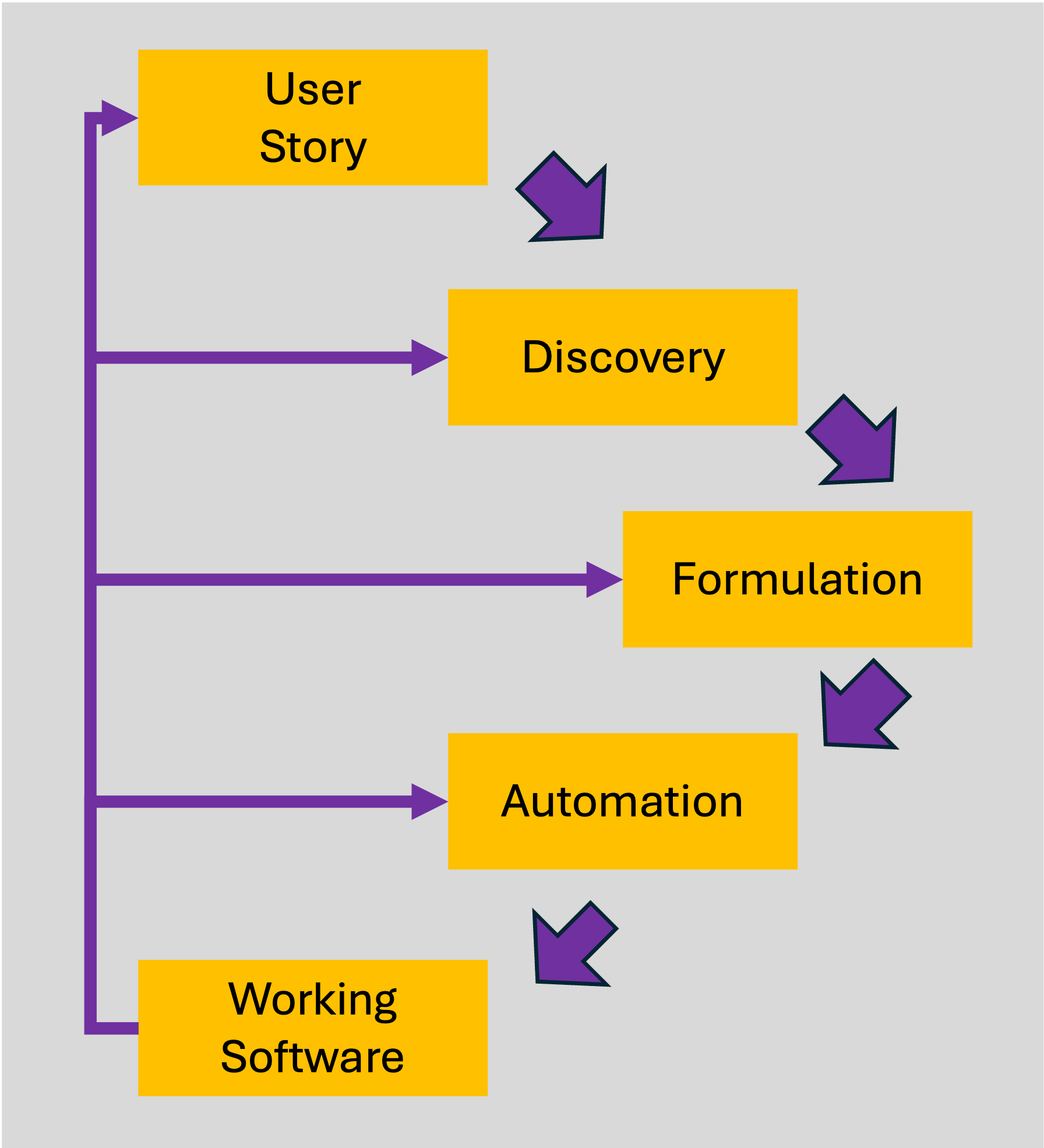
Behavior-Driven Development is a collaborative approach that emphasizes communication between developers, testers, and business stakeholders. The goal is to define clear, understandable requirements that serve as the foundation for development and testing. Two years into AI-assisted authoring, the value of BDD is the same as it was in 2010 — it's the shared understanding produced during conversation, not the Gherkin file itself. BDD focuses on three main activities:
- Discovery,
- Formulation, and
- Automation.
Source: Wopee.io
1. Discovery
Discovery involves identifying and understanding the user stories. Through collaborative discussions, often termed "3 Amigos Meetings," team members from business, development, and testing roles come together to explore the problem, potential solutions, and possible edge cases.
2. Formulation
Formulation converts the insights from Discovery into formalized requirements using structured syntax. This typically involves writing scenarios in Gherkin language, which provides a clear and consistent format for specifying features.
3. Automation
Automation turns these Gherkin scenarios into executable tests. Tools like Robot Framework can automate these scenarios, providing immediate feedback and ensuring that the software behaves as expected.
Gherkin Language
Gherkin is a business-readable, domain-specific language that describes software behavior without detailing how that functionality is implemented. It uses a set of keywords, including:
- Feature: Describes the feature under test.
- Scenario: A specific situation to be tested.
- Given: Precondition to the scenario.
- When: An action taken by the user.
- Then: The expected outcome.
- And/But: Additional steps within the scenario.
Example Mapping
Example Mapping is a straightforward and powerful technique for refining user stories and ensuring that all scenarios are covered. It involves breaking down user stories into concrete examples, rules, and questions.
3 Amigos Meetings
These meetings are essential to BDD as they bring together representatives from business, development, and testing to ensure a comprehensive understanding of the requirements:
- Business: Identifies the problem to solve.
- Development: Proposes solutions.
- Testing: Considers edge cases and potential issues.
 Source: Leonardo.ai
How Example Mapping Works
- Start with a User Story: Begin with a user story that describes a piece of functionality from the user's perspective.
- Identify Rules: Define the rules that govern the behavior described in the user story. These rules set the boundaries for what should and shouldn't happen.
- Generate Examples: For each rule, create concrete examples that illustrate the rule in action. These examples will become the basis for your scenarios.
- Raise Questions: Note any questions or uncertainties that arise during the process. These questions need to be answered to ensure a complete understanding of the user story.
Example Mapping Session
Imagine you are working on a music streaming application like Spotify. Here’s how you might conduct an Example Mapping session for a user story about creating a new playlist:
User Story: As a user, I want to create a new playlist so that I can save my favorite songs.
Rules:
- A new playlist must have a name.
- The playlist should be private by default.
- The playlist should appear in the user's profile.
Examples:
- User creates a playlist named "Chill Vibes".
- Playlist "Chill Vibes" appears on the user's profile.
- Playlist "Chill Vibes" is private by default.
Questions:
- Can a playlist be created without a name?
- Can the user change the privacy setting after creating the playlist?
User Stories and Example Mapping
For instance, consider the following user stories for a music streaming service like Spotify:
| User Story Name | Me as a | Want to | So that I can | Acceptance Criteria |
|---|---|---|---|---|
| Create New Playlist | User | Create a new playlist | Save my favorite songs | New playlist is created, visible on profile, can be private, and must have a name. |
| Add Songs to Existing Playlist | User | Add songs to playlist | Expand my existing playlist | Up to 100 songs can be added, songs must be owned, and are visible immediately on the profile. |
| Remove Songs from Playlist | User | Delete songs from playlist | Avoid playing disliked songs | Songs can only be deleted from owned playlists and can't be deleted multiple times. |
| Change Playlist Details | User | Change my playlist's details | Update names and toggle privacy | Can change name, description, status, and changes are reflected on profile for owned playlists only. |
| Check Playlist | User | Get information about playlist | Know the contents | Can obtain info about owned or public playlists only. |
Formulation with Gherkin
A well-formulated Gherkin scenario might look like this:
Feature: Create and manage playlists

Scenario: User creates a new playlist
  Given I am logged into my Spotify account
  When I create a new playlist named "Chill Vibes"
  Then the playlist "Chill Vibes" should be visible on my profile
  And it should be private by default
Good Practices in BDD
Principles for Effective Scenarios
- Business Language: Use terms familiar to business stakeholders to ensure clarity.
- Real Data: Incorporate real-world data to uncover hidden assumptions.
- Intention Revealing: Focus on what the scenario aims to achieve, not how it does it.
- Essential: Include only details that directly illustrate the rule being tested.
- Focused: Each scenario should test a single rule.
- Brief: Keep scenarios concise, ideally under five lines.
By adhering to these principles — and applying solid test design techniques — you can ensure your scenarios serve as clear, valuable documentation and maintain the flexibility to evolve with your product.
Alternative Approaches to Example Mapping
While Example Mapping is a popular and effective technique, there are other approaches that teams can use to refine user stories and scenarios:
Specification by Example (SBE)
Specification by Example involves writing detailed examples during the requirements phase to ensure all scenarios are covered. These examples become the specifications that drive development and testing.
ATDD (Acceptance Test-Driven Development)
ATDD focuses on writing acceptance tests before development begins. These tests define the criteria for success and ensure that the final product meets the user's needs.
Story Mapping
Story Mapping visualizes the user journey through the system. It helps teams understand the workflow and identify the key interactions and scenarios to be tested.
Impact Mapping
Impact Mapping is a strategic planning technique that helps teams identify the goals, actors, impacts, and deliverables associated with a project. It ensures that all development efforts align with business objectives.
Robot Framework and BDD
Robot Framework is a mature open-source automation tool (current stable: Robot Framework 7.x, released in 2024 with native asynchronous keyword support) that ships with first-class BDD support. The Given, When, Then, And, and But prefixes are recognised by the parser and stripped before keyword resolution, so a Gherkin-style step like Given I am logged in binds to a keyword named simply I am logged in. If you also want to add visual regression checks alongside your BDD scenarios, see how to set up autonomous visual testing with Robot Framework. For broader UI-coverage strategy, the ultimate guide to visual testing covers where BDD scenarios fit alongside pixel diffs.
Implementing BDD in Robot Framework
Step 1: Discovery
In this step, the team discusses user stories to generate Example Maps, which capture the rules and scenarios associated with each story.
Step 2: Formulation
The Example Maps are translated into Gherkin feature files. These files define the behaviors and expectations in a structured format that both business and technical team members can understand.
Step 3: Automation
Finally, the feature files are automated using Robot Framework. This involves writing step definitions that connect the Gherkin steps to the actual code that performs the test.
Robot Framework Basics
Robot Framework uses a keyword-driven approach to testing, which makes tests readable and easy to maintain. For new projects in 2026 we recommend Browser Library (Playwright-backed) over the older SeleniumLibrary — it's faster, has built-in auto-waiting, and handles modern SPAs without sprinkled Sleep calls. Here's a minimal test case using Browser Library:
*** Settings ***
Library    Browser

*** Variables ***
${URL}    https://example.com

*** Test Cases ***
Example Test
    [Documentation]    Verifies the example.com landing page renders.
    New Browser    chromium    headless=true
    New Page       ${URL}
    Get Title      ==    Example Domain
    Close Browser
If you're maintaining an existing SeleniumLibrary suite, the BDD patterns below apply identically — only the keyword names change.
Writing BDD Scenarios in Robot Framework
To implement BDD scenarios, Robot Framework supports Gherkin syntax out of the box. The pattern is two-step: write the Gherkin scenario in .robot syntax, then implement each step as a keyword. Robot Framework strips the Given/When/Then prefix at parse time, so the keyword definitions don't need to repeat them.
Step 1 — Define the scenario in feature-file style:
Feature: User creates a new playlist

Scenario: User creates a new playlist
    Given I am logged into my Spotify account
    When I create a new playlist named "Chill Vibes"
    Then the playlist "Chill Vibes" should be visible on my profile
    And it should be private by default
Step 2 — Implement the scenario and its step keywords in Robot Framework:
*** Settings ***
Library    Browser

*** Variables ***
${URL}         https://spotify.com
${USERNAME}    user@example.com
${PASSWORD}    password123

*** Test Cases ***
User creates a new playlist
    [Documentation]    User logs into Spotify and creates a new playlist
    Given I am logged into my Spotify account
    When I create a new playlist named "Chill Vibes"
    Then the playlist "Chill Vibes" should be visible on my profile
    And it should be private by default

*** Keywords ***
I am logged into my Spotify account
    New Browser    chromium    headless=true
    New Page       ${URL}
    Fill Text      id=username    ${USERNAME}
    Fill Secret    id=password    $PASSWORD
    Click          id=login
    Get Text       text=Welcome   ==    Welcome

I create a new playlist named "${playlist_name}"
    Click          id=new_playlist
    Fill Text      id=playlist_name    ${playlist_name}
    Click          id=create_playlist

The playlist "${playlist_name}" should be visible on my profile
    Get Element    xpath=//div[text()='${playlist_name}']

It should be private by default
    Get Element    xpath=//div[text()='${playlist_name}']/following-sibling::div[text()='Private']
AI-Assisted Gherkin in 2026
The 2026 reality: most teams now draft their first cut of Gherkin scenarios with a coding-grade LLM (Claude, GPT-5, or Copilot Chat) before the 3 Amigos meeting, then refine collaboratively. Used well, this collapses the Formulation step from hours to minutes. Used badly, it produces shallow scenarios that miss the edge cases — the part of BDD that actually pays back.
A working prompt pattern that consistently produces usable Robot-Framework-compatible Gherkin:
You are a BDD analyst. Given the user story and acceptance criteria below,
produce a Robot Framework-compatible feature file with:
  - One Feature
  - 3-6 Scenarios covering the happy path and the most likely edge cases
  - Scenarios under 5 lines, one rule each, business language only
  - No implementation detail (no selectors, no URLs)

User story: <paste user story>
Acceptance criteria: <paste bullet list>
Known edge cases to cover: <paste from 3 Amigos notes>
Rules of thumb for AI-assisted BDD:
- Discovery first, AI second. Run the 3 Amigos meeting, then use the LLM to formalize what you already discussed. Skipping Discovery and letting the LLM invent edge cases gives you plausible-looking scenarios that miss the ones that matter.
- Treat AI output as a draft. Review every scenario in pairs (dev + tester) before mapping to keywords. The cost of a wrong scenario in CI is much higher than the time saved drafting it.
- Pair AI-drafted scenarios with a self-checking suite. As the AI-generated suite grows, pair it with self-healing locators and autonomous AI testing agents that catch the regressions your scenarios didn't anticipate.
Some more tips for BDD in Robot Framework
To enhance your BDD implementation in Robot Framework, consider the following tips:
- Reuse Keywords: Create reusable keywords for common actions, such as logging in or navigating to a specific page. This reduces duplication and makes your test cases easier to maintain — and pairs well with self-healing test automation, which keeps those keywords stable when the UI shifts underneath them.
- Data-Driven Testing: Use data-driven tests to run the same scenario with different sets of data. This can be achieved using the
Examplessection in Gherkin or by defining variables in Robot Framework. - Organize Tests: Structure your tests in a way that makes them easy to understand and navigate. Use meaningful names for test cases and keywords, and group related tests into suites.
- Continuous Integration: Integrate your Robot Framework tests into a continuous integration (CI) pipeline. This ensures that your tests are run automatically whenever changes are made, providing immediate feedback on the quality of your software. Once the suite grows past the point where everyone waits for it, layer predictive test selection on top so each pull request runs only the highest-risk subset.
Example of Data-Driven Test in BDD
Feature: Login Functionality

  Scenario Outline: Successful login with valid credentials
    Given I am on the login page
    When I enter "<username>" and "<password>"
    And I click the login button
    Then I should see the dashboard page

    Examples:
      | username         | password  |
      | user1@example.com| password1 |
      | user2@example.com| password2 |
Conclusion
Getting started with BDD in Robot Framework is a powerful way to align development efforts with business goals. By following a structured process and leveraging the collaborative nature of BDD, teams can build software that truly meets user needs while maintaining high quality through automated testing — and as the suite matures, techniques like self-healing and predictive test selection keep the maintenance bill from outpacing the value. Whether you're new to BDD or looking to refine your practices, Robot Framework — paired with AI testing agents for the higher-level autonomy layer — gives you the tools to succeed. Embrace Example Mapping, lean on AI for Formulation, and keep Discovery firmly in human hands.
-
Autopilot your tests: Streamline your testing process with our guide on autopilot your Robot Framework testing. Explore our AI-Augmented BDD examples to see advanced techniques in action.
-
Empower your team with BDD-Copilot: Learn about our Robot Framework BDD-Copilot workshop and how it can enhance your team's BDD practices. Contact us for details, or book a demo to see the platform in action.
-
Experience fully autonomous testing: See pricing and sign up for a free trial of autonomous testing to see how AI testing agents fit on top of your existing BDD suite. New to Wopee.io? Check out our getting started guide.
Last updated: May 2026.
Keep reading
All postsAI Testing Agents: Hype, Reality, and What Works
AI testing agents promise to automate QA end-to-end — but which capabilities are real and which are hype? What works in 2026 and where to start.
Dec 19, 2024Report: Future of Web App Testing
Key findings from the Future of Web App Testing report: what QA pros and eng leaders think about AI, automation, and the next 5 years of testing.
Nov 4, 2024Getting Started with Wopee.io: No-Code Testing
Get started with Wopee.io in minutes, no coding required. Automate web app testing with AI, from account setup to your first autonomous test run.
Sep 16, 2024